bsates.ai
Bsates Abhiyog · free to install

Get the app on
any device.

The app installs straight from the website in under a minute. It opens full screen with its own icon and works offline after the first open.
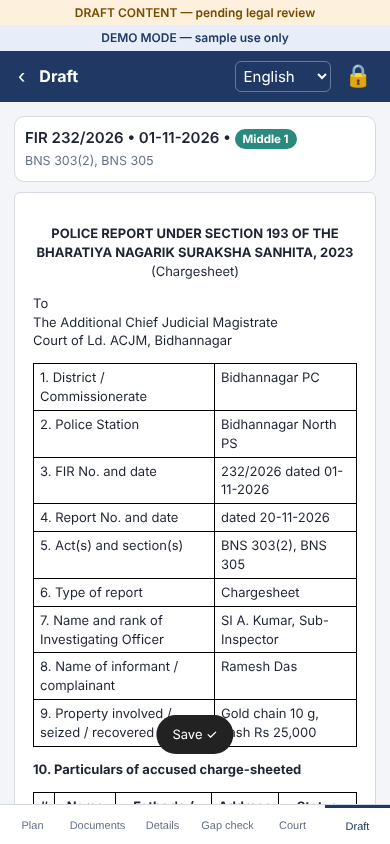
Bsates Abhiyog app showing a police-report draft

Install steps

We picked your device. Tap another tab to see the others.

Android phone or tablet

  1. Tap Open the app below. Use Chrome.
  2. A blue Install Bsates Abhiyog bar appears at the bottom. Tap Install.
  3. If the bar does not appear: tap ⋮ (top right) → Add to Home screen or Install app.
  4. Open Abhiyog from your home screen.
Open the app

iPhone or iPad

  1. Tap Open the app below. It must open in Safari. If it opens in another browser, copy the link into Safari.
  2. Tap the Share button ⬆︎ (bottom of the screen on iPhone, top on iPad).
  3. Scroll down and tap Add to Home Screen, then Add.
  4. Open Abhiyog from your Home Screen.
Open the app

Laptop or desktop (Windows, Mac, Chromebook)

  1. Click Open the app below in Chrome or Edge.
  2. Click the Install icon in the address bar (a small screen with an arrow), or the blue Install bar on the page.
  3. The app opens in its own window and is added to your Start menu or Applications.
  4. On a Mac with Safari: File → Add to Dock.
Open the app
QR code to open the Bsates Abhiyog app on your phone

On a laptop? Scan to open on your phone

Point your phone camera at the code, or type this address in your phone browser:

Store versions

Google Play — coming soonApple App Store — coming soon

The website version above is the full app and updates itself automatically.

Your cases are encrypted on your device and open with your phone's own fingerprint, face or screen lock. If the device is lost or reset, cases on it cannot be recovered. Bsates Abhiyog is a legal training and reference product, not legal advice.